
Featured Recommended Games













What Is Moon Child FE?
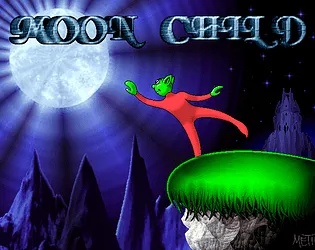
Moon Child FE (Friend Edition) is a modern source port of the classic 1997 Windows 95 platformer game Moon Child. Created by Mors, this port brings the beloved adventure to modern browsers with proper support for the latest hardware, full controller support, and various quality-of-life improvements while preserving the authentic gameplay experience that made the original special.
How to Play Moon Child FE
Controls & Movement
- Use arrow keys to move Moon Child left and right.
- Press the up arrow to jump over obstacles and gaps.
- The game supports both keyboard controls and gamepad controllers, making it accessible for both desktop and controller users.
Collecting Gems
- Your main objective is to collect shadow gems scattered throughout each level.
- These gems track your progress and serve as collectibles that persist between levels though note that leaving a level via the menu will reset your gem count.
- Finding all gems is part of the challenge!
Defeating Enemies
- Navigate through levels filled with various enemies.
- You can use your jetpack to shoot projectiles and defeat foes.
- The game features both horizontal and vertical scrolling stages, including an autoscroller level (33) that requires precise positioning to complete.
Tips & Tricks for Moon Child FE
Speedrun Mode
Enable Speedrun Mode from the options menu to display a timer in the top-left corner of the screen. This mode is perfect for competitive players who want to challenge themselves to complete the game as fast as possible.
Start your speedrun with Speedrun Mode enabled for accurate timing.
Jetpack Shooting
The game features an 'Easier Shooting' option that makes the jetpack shooting controls more intuitive. If you find the default shooting mechanics challenging, enable this option in the settings for a smoother experience.
Enable Easier Shooting if jetpack controls feel awkward at first.
Easter Egg
After collecting every shadow gem in the game, you'll be prompted to enter a key sequence. Enter 'S' as the final letter to unlock a special easter egg! This is one of the hidden secrets waiting for dedicated collectors.
Collect all gems and enter 'S' as the final key for a special surprise!
Why Play Moon Child FE?
A Lost Classic Returns
Rediscover a hidden gem from 1997 that has remained beloved by those who played it. Moon Child offers a unique platforming experience that stands the test of time.
Nostalgic Yet Modern
Enjoy authentic retro gameplay enhanced with modern conveniences like automatic saving, controller support, and proper display scaling for today's screens.
Free Instant Access
No cost, no download, no installation required. Simply open your browser and start playing. Experience this piece of gaming history in seconds.
Frequently Asked Questions
Moon Child FE is available on Windows, Linux, and as a web-based HTML5 version that runs in any modern browser. The browser version is perfect for playing without any installation, while desktop versions offer native performance.
Yes, Moon Child FE is a free game. The source port by Mors is available at no cost, allowing everyone to experience this classic 1997 platformer on modern hardware without any payment required.
Moon Child FE features full controller support with independent input mapping for 'Up' and 'Jump' buttons. Simply connect your gamepad and the controls will work automatically. Note that controller input mapping is fixed rather than customizable.
Yes, the game supports both fullscreen and windowed display modes. You can toggle between these modes using the in-game options or by pressing F11. The port also supports 50FPS and 60FPS with Vsync for smooth gameplay.
The 'Safe Visuals' option makes the final level slightly easier on the eyes by reducing potentially uncomfortable visual effects. This is recommended for players who may be sensitive to flashing or intense visuals during the game's climax.
Moon Child FE is based on the later iOS release with various features restored from the original Windows 95 version, including the menu layout and FMV sequences. The port adds modern enhancements like automatic saving, controller support, and improved scaling.
In both the original game and this port, leaving a level via the escape menu will reset your collected shadow gems for that stage. To preserve your progress, complete each level normally by reaching the exit rather than backing out.
Windows and Linux versions of Moon Child FE are available for download on GitHub. The browser version on itch.io provides the most accessible way to play without any downloads or installation required.
Moon Child follows the journey of a young protagonist on an adventure to find his way home. The game's touching narrative and memorable characters have made it a beloved classic among retro gaming enthusiasts.
While the game is primarily designed for desktop and controller play, the HTML5 web version can be accessed on mobile browsers. However, the full experience with controller support is optimized for desktop and gamepad use.
Moon Child FE features multiple stages across different worlds, including both standard platforming levels and special autoscroller sections. The game offers a complete adventure spanning numerous levels for players to explore.
Yes! The port includes automatic saving and loading of progress. Your game state is saved automatically, so you can close the browser or exit the game and return to where you left off without losing any progress.
No Download Required - Play Instantly!
Moon Child FE runs directly in your web browser using HTML5 technology. There's no need to download any files or install software - simply click 'Start Game' and begin your adventure with Moon Child right away. The source port includes automatic saving and loading, so your progress is preserved even if you close the browser tab.
Recommended Games
Want to scratch-off's all day? Scritchy Scratchy is a super-satisfying scratch card incremental game where luck is your weapon. Buy stacks, unlock auto-scratching, and chase massive jackpots. Glittering riches are just a scratch away on Scritchy Scratchy!
Key Features of Moon Child FE
Modern Source Port
Experience the authentic 1997 gameplay with proper support for modern Windows and Linux systems. The port includes shimmer-free image scaling and runs smoothly on contemporary hardware without compatibility issues.
Full Controller Support
Play with your favorite gamepad thanks to complete controller support. The port features independent input mapping for 'Up' and 'Jump' controls, giving you precise control over Moon Child's movements.
Browser-Based Play
No downloads or installations required - play Moon Child FE instantly in your web browser. The HTML5 version provides the same great experience across any device with a modern browser.
Speedrun Mode
Challenge yourself with the built-in speedrun timer. Track your completion time as you master each level and aim for the fastest possible run through the game.