Featured Recommended Games














What Is Drink the Ocean?
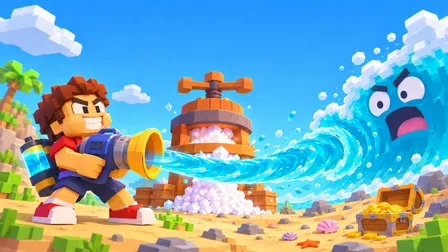
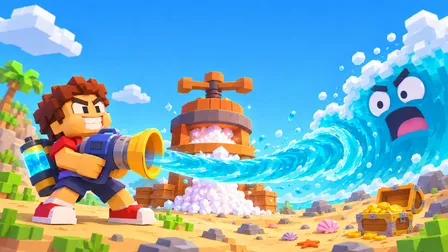
Drink the Ocean is a blocky first-person simulator by Pinidi Studio. You walk to the water, sip through a straw, and press the water into salt to spend on upgrades. As the sea drops, a shipwreck, whale skeleton and sunken city appear.
How to Play Drink the Ocean
Drink and Press
Stand at the water and left click to sip through the straw.
On phones, hold the DRINK button.
When your belly is full, stand under the beach PRESS to squeeze the water into salt.
Shop for Upgrades
Step on the blue SHOP pad and spend salt on a bigger belly, extra straws, a mouth vacuum or a pocket whirlpool.
Each upgrade helps you drain the ocean faster in Drink the Ocean.
Pull the Plug
Drain the ocean down to the plug and pull it.
Then start a stronger new ocean.
You can pick cola, lemonade, slime or lava for your next run in Drink the Ocean.
Why Play Drink the Ocean
Simple, Clear Loop
Sip, press, shop and pull the plug. Drink the Ocean keeps the goal obvious, so you can learn it in a minute and keep improving your drain speed with each upgrade.
Secrets Under the Water
Lowering the waterline reveals a shipwreck, a whale skeleton and a sunken city. Sky Duck boons and achievements give you more reasons to keep draining.
New Oceans to Drain
After you pull the plug, start a stronger ocean of cola, lemonade, slime or lava. Each new run in Drink the Ocean lets you use your upgrades again.
Free on Any Device
Play Drink the Ocean free in a browser on desktop, Android or iOS. No download or account is needed, and the game supports 15 languages in its settings.
Play Drink the Ocean Without Download
Drink the Ocean runs in your browser on desktop, Android and iOS. You need no account and no install. It is a browser game, so you can start playing right on this page. Progress is saved by the hosted player and your browser, so clearing site data may reset a run.
Recommended Games
If you enjoy Drink the Ocean, try Azeroth Survivors next. It is another free browser game on this site that you can open and play right away, with no download or account.
Drink the Ocean FAQ
Yes. You can play Drink the Ocean free online in your browser on desktop, Android or iOS. No account or download is required on this site.
Not right now. There is no official Steam release of Drink the Ocean from Pinidi Studio. You can play the free browser version on this page instead.
Drink the Ocean was developed by Pinidi Studio. It is an HTML5 browser game for one player, listed with a release date of November 10, 2026.
Drink water until your belly is full, then stand under the PRESS on the beach. The PRESS squeezes the water into salt, which you spend at the SHOP pad.
Spend salt on a bigger belly, extra straws, a mouth vacuum and a pocket whirlpool. These upgrades help you hold more water and drain the ocean faster.
Pull the plug at the bottom and start a stronger new ocean. You can choose cola, lemonade, slime or lava for your next run in Drink the Ocean.
On PC, use WASD to move, the mouse to look, left click to drink, Space to jump, 1 2 3 for tools, T to go home, E for Sky Duck gifts, P for settings and Tab to free the cursor.
No. This Drink the Ocean is a browser game by Pinidi Studio, so you can play it here without Roblox. The Roblox game Drink The Ocean For Brainrots is a different game.
The hosted version supports 15 languages, including English, Spanish, Portuguese, French, German, Italian, Japanese, Korean and Chinese. Pick the language in the game settings.
Saving is handled by the hosted player and your browser, not by an account on this site. If you clear site data or switch browsers or devices, a run may not carry over.
Key Features of Drink the Ocean
Blocky First-Person Draining
Walk to the water and sip it dry through a straw in a blocky first-person world. Salt from the beach PRESS is your currency for every upgrade in Drink the Ocean.
Shop Upgrades and Tools
Spend salt on a bigger belly, extra straws, a mouth vacuum and a pocket whirlpool. Collect Sky Duck boons and achievements to help each run go faster.
Secrets and New Oceans
Uncover a shipwreck, whale skeleton and sunken city as the water drops. After pulling the plug, start a new ocean of cola, lemonade, slime or lava.
Drink the Ocean Tips and Tricks
Keep Pressing Salt
Empty your belly at the PRESS as soon as it fills. That way you never stall at the shoreline and can keep sipping without wasting time in Drink the Ocean.
Press salt out as soon as your belly is full.
Spend Salt Early
Visit the blue SHOP pad often. Small upgrades such as a bigger belly or extra straws stack up and make each trip to the water drain much more.
Buy a bigger belly or extra straws first.
Use Your Tools
Once you unlock the mouth vacuum or pocket whirlpool, switch tools with the 1, 2 and 3 keys. Different tools pull water in different ways, which speeds up the drain.
Press 1, 2 or 3 to switch tools.
Gifts and Shortcuts
Press E to open Sky Duck gifts and get a boon for your current run. Press T at any time to go home, which saves a long walk back from the water.
E opens Sky Duck gifts. T takes you home.