Featured Recommended Games










What Is Chirpy Sky?
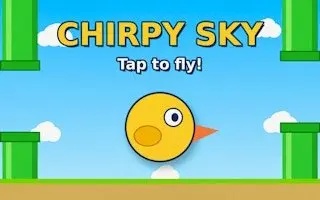
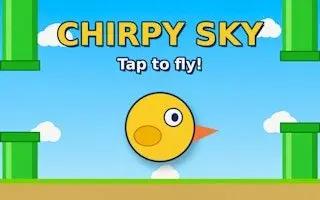
Chirpy Sky is a free browser game starring a cheerful cartoon bird with a bright red crest, flapping across a wide blue sky filled with soft white clouds. The official GamePix edition loads directly in your browser, so there is nothing to download. Click the play button, follow the short control prompts shown inside the game, and start flying within seconds.
How to Play Chirpy Sky
Click to Start
- Open the game panel on this page and click the start button.
- Chirpy Sky boots inside the player area, so there is no download, no account, and no installation step required.
Focus the Player
- Click once inside the game frame to give it focus.
- Keyboard controls stay inactive until the player has focus, so a single click is often all you need before your inputs register.
Follow the Prompts
- The game shows its own instructions and control prompts on screen.
- Follow those hints as you play, and use the fullscreen button when you want a wider view of the sky.
Why Play Chirpy Sky Online
Zero Download, Zero Fuss
The entire game lives in the player on this page. No installer, no launcher, no waiting on a download bar. You can be flying within seconds of landing on the page.
Cheerful Cartoon Style
A bright red-crested cartoon bird against a wide blue sky with fluffy clouds keeps the whole thing light and friendly, so it is an easy game to look at and to pick up again.
Works on Every Screen
Because it runs in a browser, Chirpy Sky works on desktop, tablet, and phone. Turn your phone to landscape if the game asks, then use the Chirpy Sky fullscreen control for a wider view of the sky.
Free and Instant
There is no account to create and no purchase to make. Chirpy Sky is free to play, saves through your own browser settings, and starts with a single click whenever you are ready for a fresh run.
Chirpy Sky Tips and Tricks
Focus Before You Fly
Chirpy Sky ignores keyboard input until the game frame itself has focus, which is the most common reason a new player thinks the controls are broken. Click once inside the player area before you touch the arrow keys or the space bar.
Click inside the player once, then play. That single click fixes almost every control issue.
Read the On-Screen Prompts
The game explains its own objective and available actions through prompts shown inside the player, and those prompts reflect the exact build you are running. Reading them first saves time and keeps you from guessing.
Spend ten seconds on the in-game guide first. It is the most accurate instruction available.
Use Fullscreen for More Sky
A larger play area means more of the sky fits on screen at once and the on-screen control prompts are easier to read, especially on touch devices where small buttons are awkward to hit.
Hit fullscreen before a long run. Bigger view, easier prompts, same game.
Keep a Clean Browser Session
Chirpy Sky stores its save options and progress inside your browser, so clearing cookies or browsing data wipes that state. Clear the data only when you want a clean slate, not mid-run.
Clear site data only when you want a fresh start, never mid-run.
Quick Break Sessions Work Best
Chirpy Sky is designed for short, satisfying arcade sessions rather than long campaigns, so it fits naturally into a coffee break or a queue. Leave this tab open and you are one click away.
Keep the tab open. One click is all it takes to jump back into the sky.
Looking for another free browser game to play while you wait? Poxel.io is a great companion to Chirpy Sky, since it also runs instantly in your browser with no download at all. Where Chirpy Sky gives you a light, cheerful bird flight break, Poxel.io offers a completely different kind of challenge, so you can switch between a relaxing round and something more competitive whenever you like.
Chirpy Sky FAQ
No. Chirpy Sky runs inside an embedded player on this page, so there is no download, installer, or launcher involved. Open the page, click the start button, and the game begins. It also works well on shared computers, phones, and tablets.
The game only listens for keyboard input once the player has focus. Click once inside the game frame before you press any keys and the controls will respond. The game also displays its own control prompts on screen so you can check the expected inputs.
Yes, Chirpy Sky is free to play. There is no purchase required, no account to create, and no trial timer. The official GamePix edition is embedded on this page, so you can start a session immediately.
Open Chirpy Sky and look at its own menu. The game explains the objective and the available actions directly on screen, which is the most reliable guide since it matches the exact build you are playing.
Save options and progress depend on your browser settings, so keeping the same browser and device gives you the most consistent experience. Clearing site data or using private browsing may remove previously saved progress.
Yes. The game is built to run in a browser and adapts to different screen sizes, so it works on desktop, tablet, and phone. Use the fullscreen control for a larger view and rotate to landscape if asked.
A blank panel usually means the game is still booting or the browser is blocking embedded content. Give it a few seconds, then try the reload button above the player. Switching off an ad blocker or privacy extension can also help.
Use the fullscreen button that sits above the game player on this page. Expanding the play area gives you a wider view of the sky and more room for the on-screen control prompts to stay readable.
Chirpy Sky is a lightweight browser game with a simple cartoon presentation, so it does not demand a powerful machine. If you notice stutter, close other heavy tabs and enable hardware acceleration in your browser settings.
The publisher may display ads in the player. When an ad appears, use its normal close, skip, or continue control to get back to the game. Ad behaviour is handled by the publisher and can differ by region.
Why Players Love Chirpy Sky
Instant Browser Play
Chirpy Sky runs inside an embedded GamePix player on this page. There is no download link to chase, no installer to approve, and no launcher to configure. Click once and you are already flying.
Bright Cartoon Sky
The game pairs a cute cartoon bird with a clean blue sky and puffy white clouds. The cheerful art style of Chirpy Sky keeps the screen readable and light, so a short session feels relaxing rather than intense.
Simple One-Input Style
Chirpy Sky is built around straightforward action anyone can pick up. Click the player, use the keyboard or touch prompts shown on screen, and follow the in-game guide without a long tutorial.
Free To Play Anywhere
Chirpy Sky is free to play and works on desktop, tablet, and phone browsers alike. Progress and save options follow your own browser settings, so you can play on the move.